Secure Remote Access with Multi-Factor Authentication (MFA)

Easily validate users' identity with Multi-Factor Authentication (MFA).

SendQuick Conexa

Prevent Data Breaches With
Strong Authentication

As businesses grow more international and employees and clients more mobile, quick and efficient dissemination of information is crucial for businesses to stay competitive.

Unfortunately, the proliferation of threat from hackers, viruses and malicious software poses challenges in maintaining a stream of readily available information, as well as managing the information transfer securely to eliminate or mitigate security breaches.

Multi Factor Authentication for Remote Access is the simplest and most effective way to make sure users really are whom they say they are. It is an industry-accepted solution for remote user authentication.

SendQuick provides an ideal solution for organisations looking for a cost-effective and seamless MFA implementation. Can I deploy SendQuick on-premise or in the cloud? Available as both an on-premise solution and in the cloud as SendQuick Cloud Auth. What authentication methods does SendQuick support for MFA? It supports a range of authentication methods including SMS OTP, Soft Token, and Email OTP, together with Authentication and Authorisation (AA) capability.

NEW! SendQuick Conexa now supports FIDO2 standards such as Yubikey, Digital ID such as Singpass and Yoti, and Biometric Authentication.

Key Features of
SendQuick MFA Solution

Easy Deployment with SMS OTP, Mobile Soft Token, Hard token, Push Notification and Email OTP

  • Wide variety of authentication options
  • Low maintenance for companies
  • Soft Token is immune to latency, network coverage, and delivery issues
  • Convenient, easy to use and affordable
  • Industry accepted solution for secure remote access

Wide Support For Different Database Servers

  • Checkpoint SSL VPN
  • My SQL
  • SQL Server
  • PostGreSQL
  • Oracle
  • RADIUS
  • Microsoft Active Directory (AD)
  • LDAP

Protocols for Authentication

  • SAML
  • RADIUS
  • API

Authenticators and OTP methods supported

  • SMS OTP
  • Email OTP
  • Soft Token (SendQuick App; Microsoft Authenticator; Google Authenticator)
  • Hard Token (any SHA2, SHA256 compliant)
  • Push Authentication (SendQuickAPP)
  • Passkey (Android, iOS)
  • Digital ID eg. SingPass and Yoti NEW
  • FIDO2-capable YubiKey NEW
  • Biometric Authentication NEW

Secured Remote Access Solutions Supported

  • Checkpoint SSL VPN
  • Cisco SSL, VPN
  • Juniper SSL VPN
  • F5 SSL VPN
  • SonicWall VPN
  • Citrix Netscaler
  • VMWare View
  • MS Windows Login
  • Palo Alto SSL VPN
  • SSL VPN/Firewall/Devices that support RADIUS or SAML

Types of MFA Use Cases

Secure Remote Access to:

  • Firewall, VPN, SSL, Windows
  • Financial / Accounting System
  • Human Resource System
  • Business Web Portal
  • Switches

Learn more about SendQuick MFA Solution

    There are three ways to get started with
    SendQuick MFA Solution

    IT Alert Management System Singapore

    Appliance

    Convert Email To SMS Singapore

    Cloud

    SNMP Trap To SMS Singapore

    Virtual Machine

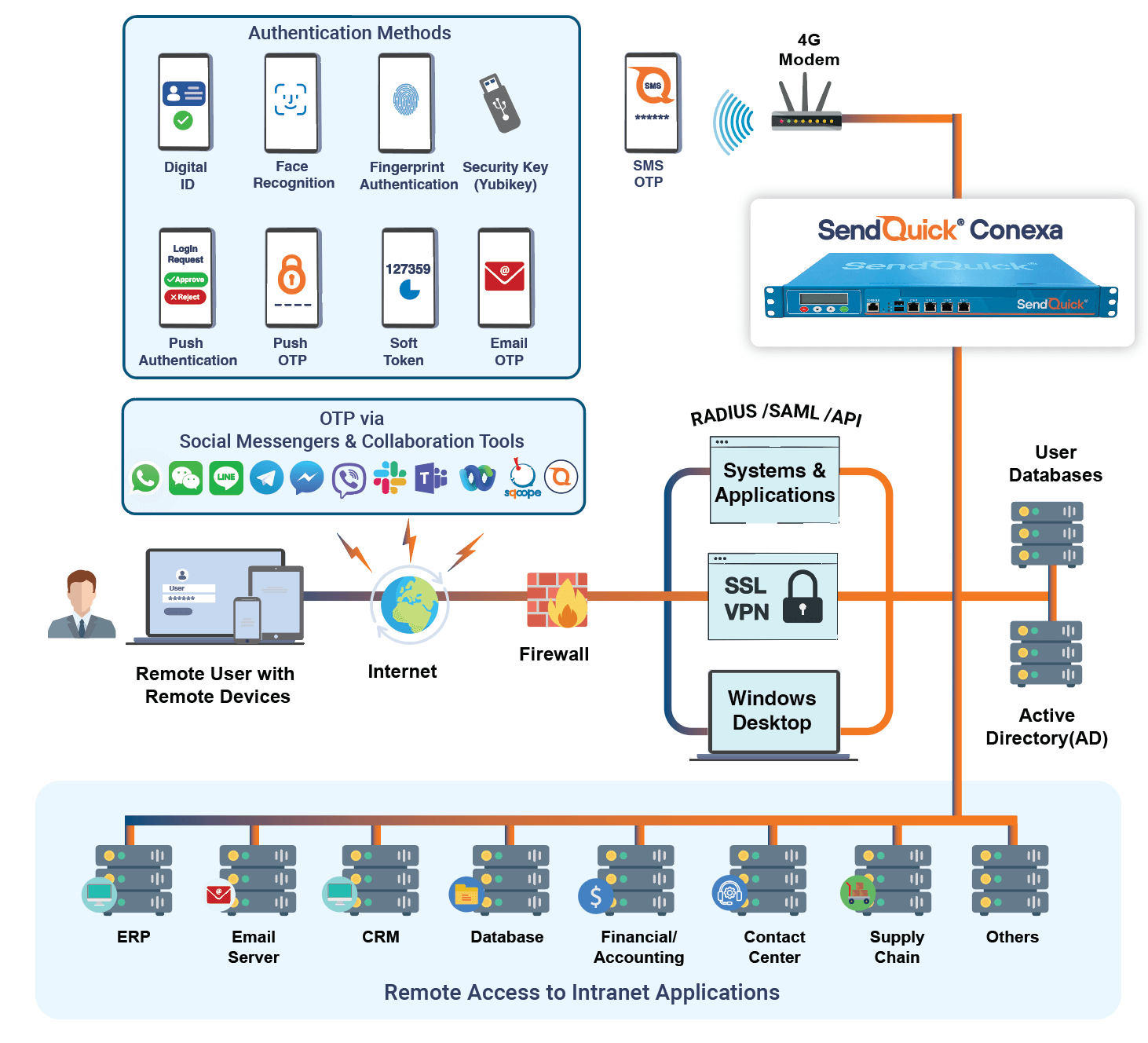
    How SendQuick MFA Solution Works?

    SendQuick Conexa - How to Access Your Account Using Android/ Apple Passkey

    SendQuick Conexa Server Integration with SendQuick Credential Provider for Windows Login

    SendQuick Conexa Server Integration with New SendQuick App
    Soft Token, Push OTP and Push Authentication

    SendQuick Conexa Server Integration with Digital ID (Singpass)

    SendQuick MFA Solution

    Multi-Factor Authorization (MFA) with One-Time Password (OTP) via SMS, Email, Soft Token, Push OTP and Push Authentication.

    Secure remote access to data through MFA approaches with the new SendQuick app, SendQuick Credential Provider for windows login and also with Digital ID eg. Singpass.

    Frequently Asked Questions

    Multi-Factor Authentication (MFA) strengthens login security by requiring users to verify their identity using multiple factors such as passwords, mobile devices, or security keys. Enterprise solutions like SendQuick Conexa help organisations deploy MFA securely across VPNs, web applications, and internal systems.

    Multi-Factor Authentication (MFA) strengthens login security by requiring users to verify their identity using multiple factors such as passwords, mobile devices, or security keys. Enterprise solutions like SendQuick Conexa help organisations deploy MFA securely across VPNs, web applications, and internal systems.

    Multi-Factor Authentication (MFA) strengthens login security especially for remote access by requiring users to verify their identity using multiple factors such as passwords, mobile devices, or security keys. Enterprise solutions like SendQuick Conexa help organisations deploy MFA securely across VPNs, web applications, and internal systems.

    Secure login authentication systems are technologies used to verify the identity of users before granting access to applications or networks. They typically use stronger authentication methods such as multi-factor authentication, biometrics, or security keys instead of relying only on passwords. This helps organisations reduce the risk of unauthorised access, phishing, and credential theft. Solutions such as SendQuick Conexa can help organisations implement secure authentication systems across their infrastructure.

    Testimonial

    Take the next step with us

    Download Solution Sheet

    Discover how SendQuick Multi-Factor Authentication Solutions can help you provide secure remote access to their customers and employees

    View Our Case Studies

    Discover how others have adopted our SendQuick Solutions to help them in their business operations.